Web previews plugin
The Web Previews plugin for Dato is used in order to setup preview links for editors in Dato. The preview links will appear in the right sidebar while editing. It speaks to the API endpoints to prepare preview-links based on the schematypes provided, for example articles or pages.
It takes a secret that is set in the .env-file of the project and redirects to the enable-endpoint for a draft-version of the content and respectively the disable-endpoint for published content.
Setup in Dato and Vercel
-
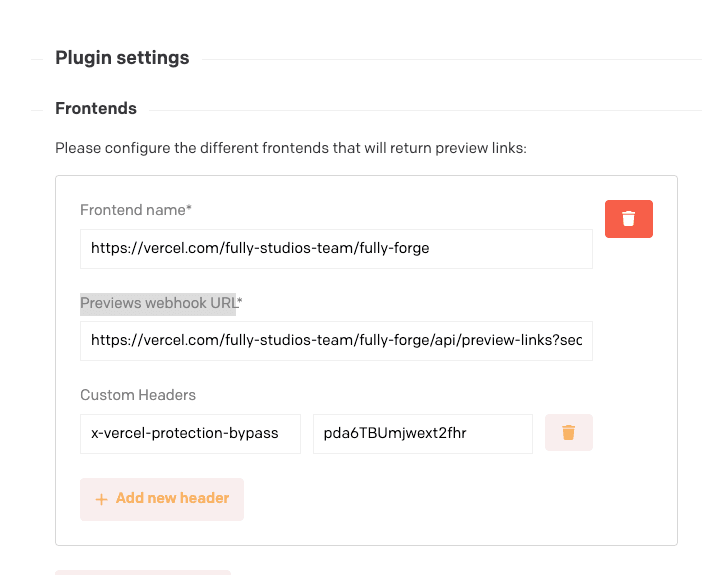
In Dato navigate to Plugins in Configuration
-
Enter the URL for the frontend under “Frontend name” - for example: https://vercel.com/fully-studios-team/fully-forge
-
Enter the URL for the preview-links API endpoint under “Previews webhook URL” - for example: https://vercel.com/fully-studios-team/fully-forge/api/preview-links?secret=secret
-
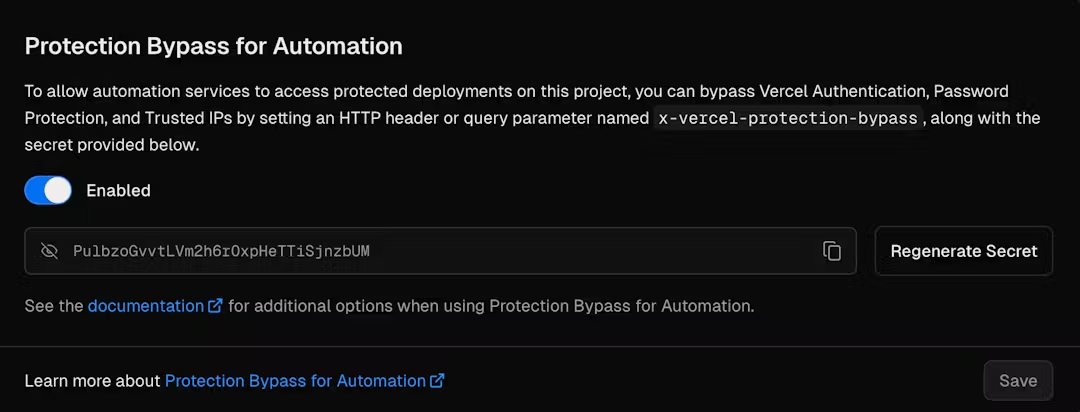
Domains that are password protected will need to have custom headers to bypass this. To do this, first navigate to the vercel project and go to settings. Under “Depoloyment Protection” you will find “Protection Bypass for Automation”. If any of your deployments have password protection you can enable this and generate a secret. This secret will automatically be set as a deployment variable.
-
Add the generated secret in the plugin configuration under Custom Headers.
API endpoint
-
Generate a secret token, preferably using 1Password and add it to the DATOCMS_PREVIEW_TOKEN in your environment file. Make sure it’s URL friendly and don’t forget to save it to the onboarding documents, such as a private note in 1Password.
-
Open
src/app/api/preview-links/route.tsto begin configuring the different itemTypes used in your project. -
The
generatePreviewUrlfunction goes through each itemtype and returns slugs. If your project uses any models besides the ones used in the boilerplate add them in a new case within the switch. For example if the project uses a “job” model it would be added like this:case "job": return`/jobs/${item.attributes.slug}`; -
If you’re unsure which models the project the CDA-Playground can provide a good overview of this. Or try console logging the
itemType.attributes.api_keyto see what Dato’s API returns.
More reading: